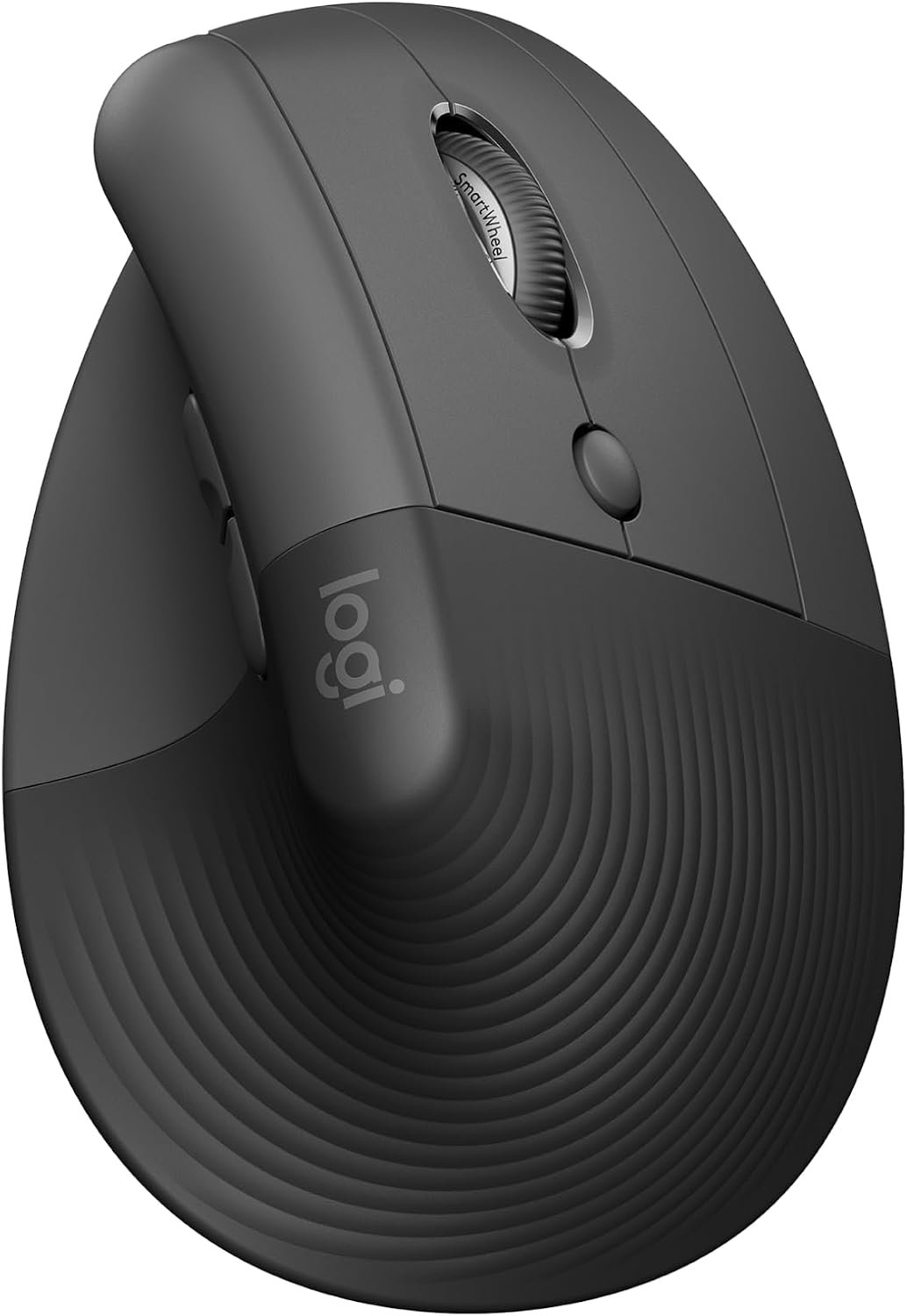
Finally, a desk accessory that doesn't hurt
The Logitech Lift is a solid ergonomic choice for those with small to medium hands looking to escape chronic desk-job wrist fatigue. While it offers excellent posture benefits and quiet main clicks, heavy-handed users or gamers will likely find the side buttons frustratingly loud and stiff.
What We Liked 👍
- Promotes a more natural arm posture
- Exceptionally quiet primary mouse clicks
- Comfortable textured grip and thumb rest
- Solid battery life up to two years
- Easy connection via Bluetooth or Bolt
What Could Be Better 👎
- Side buttons are loud and stiff
- Not suited for large hands
- Dust collects in base seams
- White model prone to staining
Wrist agony is not a personality trait
Let us be honest, the standard computer mouse is a relic of a time when we did not spend ten hours a day staring at spreadsheets while our tendons screamed for mercy. If you are reading this, you probably have a wrist that clicks more than your mechanical keyboard. Enter the Logitech Lift, a mouse that attempts to save your anatomy by twisting your hand into a more vertical, handshake-like position. It is basically the tech industry finally admitting that the flat, horizontal mouse shape is a slow-motion torture device for the human body.
Marketing fluff aside, the 57 degree tilt is genuinely clever. It takes the pressure off the median nerve, which is a fancy way of saying your hand will hate you slightly less at the end of the work day. I have seen enough desk setups to know that most people are just one repetitive motion injury away from a career change, so moving to something that actually respects human physiology is a low bar that somehow most manufacturers still fail to clear.
The design is surprisingly compact. If you have hands the size of a professional basketball player, you are going to feel like you are trying to operate a toy. But for the average user, the textured grip feels like an actual attempt at quality rather than the usual slippery plastic garbage we get at this price point. It sits firmly, feels balanced, and does not require a week of physical therapy just to get used to the movement.
However, do not mistake this for a productivity panacea. You are still working a job where you move a cursor across a screen until your eyes cross. The Lift does not make the work more interesting, it just makes the physical act of inputting data slightly less painful. It is an ergonomic bandage on the wound of corporate monotony, but I will take that over the status quo any day of the week.
When you look at the price point of roughly 40 Euros, it is a decent investment in your future self. I have seen mice that cost three times as much with half the build quality. Logitech knows the vertical game well, and while the Lift feels like a refined version of their previous attempts, it remains a tool designed for survival rather than excitement. Just remember that changing your gear is only half the battle; the other half is actually taking breaks instead of living in front of your monitors.
Spec sheet hero or hardware dud?
Let us dissect the features before you swipe your credit card. The sensor is a laser-based affair that tracks fine on almost any surface, from your mahogany desk to that weird felt mousepad you bought because it looked aesthetic. It offers 4000 DPI, which is more than enough for navigating Windows or doing basic graphic design. If you are trying to use this for high-stakes competitive gaming, stop. It was never meant for that, and you will only end up cursing the sensor for not being snappy enough for your twitch reactions.
The battery life is a massive plus. With a promised 24 months on a single AA battery, you can basically forget it exists, which is the gold standard for office tech. Connectivity is handled via Bluetooth or the Logi Bolt receiver. Bluetooth is fine for most, but if your office has a million interference sources, the Bolt receiver keeps things stable. It is the kind of reliability that you do not notice until it fails, and in my experience, Logitech's wireless protocols are about as solid as they come.
Then there is the issue of the buttons. Logitech heavily advertises the silent clicks, and for the left and right mouse buttons, they actually deliver. They are whisper-quiet, perfect for open-plan offices where your coworkers do not need to hear your every move. But then someone in engineering decided the side buttons, the ones you use for back and forward navigation, needed to be loud, stiff, and tactile. It is a jarring contrast. It is like driving a luxury car where the steering wheel is made of sandpaper. Why make the primary buttons silent and the secondary ones sound like a gunshot? It is a baffling design choice that will frustrate you every time you try to go back a page in your browser.
Final thoughts for the cubicle dweller
If you are someone who spends their life in spreadsheets or email and your wrist is starting to complain, buy the Logitech Lift. It is an affordable, comfortable, and well-made upgrade that will make your desk life more bearable. However, if you have massive hands, are a serious gamer, or require silent navigation buttons for your side-scrolling addiction, skip it. It is a specialized tool for a specific problem, and for its intended purpose, it is one of the few pieces of gear that actually manages to deliver on its ergonomics promise.