
The Swiss Army Knife That May or May Not Open Bottles
The LIONWEI Laptop Docking Station promises to be the ultimate hub for your tech needs, but does it deliver or just take up valuable desk real estate like a needy paperweight? Let's find out.
What We Liked 👍
- Plugs into everything but a toaster
- Makes your desk look important
- Surprisingly doesn’t catch fire
- Gets warm, but not 'call the fire department' warm
What Could Be Better 👎
- Cable management is a nightmare
- USB 2.0 ports in 2025? Really?
- May summon a demon when hibernating
- Power delivery math is confusing
The Dongle That Dreams Big, But Maybe Too Big
Look, I get it. You want one cable to rule them all. The LIONWEI hub arrives like a conquering hero with 13 ports, promising to turn your laptop into a command center. And for the most part, it does—until you realize your desk now looks like a spiderweb of cables and you're spending more time untangling than working.
The build quality is... fine. It won't win any design awards, but it won't disintegrate if you look at it wrong either. It does get warm, like it's blushing from all the attention, but never hot enough to cook an egg—which, frankly, is a missed opportunity.
Features: More Ports Than a Pirate’s Map
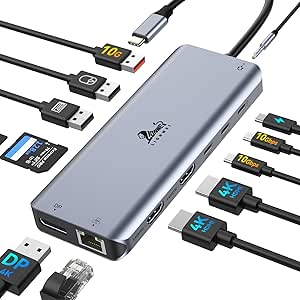
This thing has ports for days. Dual HDMI? DisplayPort? SD/TF slots? Ethernet? It's like someone took a checklist of tech buzzwords and crammed them into one plastic rectangle. The 10Gbps USB ports are zippy, though the inclusion of USB 2.0 ports is like finding a floppy disk in a spaceship.
The power delivery is a bit of a head-scratcher. It claims 100W, but subtracts 18W for 'operational costs'—like a tech version of taxes. Your laptop gets 82W, which may or may not be enough, depending on how demanding your laptop is. It's not quite a dealbreaker, but it's definitely a deal-nudger.
Final Verdict: Not Perfect, But It’ll Do
The LIONWEI docking station is a solid B+ student—it does the job, but you can tell it’s not going to Harvard. If you need a hub that checks most boxes without emptying your wallet, go for it. Just be prepared to sacrifice some desk space and possibly your sanity when cables start tangling.